Business software · Buyer's guide
How to choose a password manager
Start with what you need to share and on how many devices, then check the renewal price. Bitwarden and Proton Pass have free plans that work on unlimited devices; 1Password and Dashlane offer 14-day trials instead. Family plans cover 5 to 10 people, and business plans are priced per user, often with a minimum.
A password manager stores every login in an encrypted vault, fills them in for you, and creates a new strong password for each site. The six we track all do that. What separates them is who you need to share with, how many devices you use, how you can try them, and what you pay after the first term.
We have not run hands-on tests of these password managers yet. This guide compares what each vendor publishes on its own pricing page, with the date we checked it.
Start with the free plans
Two of the six have a free plan with no device limit. Bitwarden's free account covers unlimited devices and passwords, and lets you share with one other person. Proton Pass Free covers unlimited logins, notes and cards on unlimited devices, and adds 10 hide-my-email aliases.
NordPass also has a free plan, but its pricing page marks access on multiple devices as not included. If you use a phone and a laptop, that matters more than any other feature.
1Password, Dashlane and Keeper have no free plan. 1Password and Dashlane both offer a 14-day trial with no card required.
| Product | Free plan |
|---|---|
| Bitwarden | Yes: unlimited devices and passwords, sharing with one other user |
| Proton Pass | Yes: unlimited logins, notes and credit cards on unlimited devices, 10 hide-my-email aliases, 2 vaults, 1 GB storage |
| NordPass | Yes. The Free plan card marks access on multiple devices, Password Health, Data Breach Scanner and file attachments as not included |
| 1Password | No free plan listed on the pricing page; 14-day free trial |
| Dashlane | No free plan listed on the pricing page; 14-day free trial of Premium |
| Keeper | Not stated |
What the paid plans cost
On their cheapest terms, paid personal plans start at between $1.39 and $5.42 a month. The headline price is often a first-term discount, so read the renewal column. 1Password's Individual plan was $2.99 a month for the first year on annual billing and $3.99 a month after that. NordPass and Proton Pass show discounted first-term prices and do not state what they renew at.
| Product | Cheapest paid plan | Renews at | Ways to try it | Visit |
|---|---|---|---|---|
| Bitwarden | $1.65/mo (Premium, 1 year) | Same price | Free plan | Visit Bitwarden (no commission) (opens in a new tab) |
| Proton Pass | $2.99/mo (Pass Plus, 1 year) | Not stated | Free plan, 30-day money-back | Visit Proton Pass (affiliate link, opens in a new tab) |
| NordPass | $1.39/mo (Premium, 27 months) | Not stated | Free plan, 14-day trial, 30-day money-back | Visit NordPass (affiliate link, opens in a new tab) |
| 1Password | $2.99/mo (Individual, 1 year) | $3.99/mo | 14-day trial | Visit 1Password (no commission) (opens in a new tab) |
| Dashlane | $5.42/mo (Premium, 1 year) | Same price | 14-day trial | Visit Dashlane (no commission) (opens in a new tab) |
| Keeper | $3.58/mo (Personal, 1 year) | Same price | None listed | Visit Keeper (no commission) (opens in a new tab) |
Plans for families
If you want to share logins with a partner or children, a family plan is cheaper than separate accounts. Family plans cover between 5 and 10 people. Dashlane's Friends & Family plan is the largest at 10 members, and Bitwarden, Proton Pass and NordPass each cover 6.
| Product | People covered |
|---|---|
| Bitwarden | Families: up to 6 users |
| Proton Pass | Pass Family: 6 users |
| NordPass | Family: 6 user accounts |
| 1Password | Families includes 5 users |
| Dashlane | Friends & Family: 10 members |
| Keeper | Family: 5 users |
Plans for a business
Business plans are priced per user, and several have a minimum. 1Password's Teams Starter Pack needs at least 10 users, and NordPass sells Teams as a 10-user pack and needs 5 users on Business.
If your company signs in with Okta, Microsoft Entra ID or Google, check which tier includes single sign-on. It is usually the top business tier: Bitwarden lists it on Enterprise, and 1Password on Business.
| Product | Single sign-on |
|---|---|
| 1Password | Business (Okta, Entra ID, OneLogin, Duo and more) |
| Bitwarden | Enterprise |
| NordPass | Teams: Google Workspace SSO login. Enterprise: Entra ID, MS ADFS and Okta |
| Dashlane | Omnix Password Management (business) |
Questions to ask before you pay
- How many devices will you use? A free plan limited to one device type is a trial, not a plan.
- Who do you need to share with? One person, a household, or a team changes which plan you need.
- What does it renew at? If the pricing page does not say, ask before you pay for a long term.
- Can you get your data out? Export your vault once you have set it up, so switching later is easy. Bitwarden states encrypted export is available on every account.
- Can you try it first? Use a free plan, a 14-day trial or a 30-day money-back guarantee to move a few real logins in before you commit.
Where to start
If you want to pay nothing, start with Bitwarden or Proton Pass. Both free plans work across all your devices. If you would rather start with a paid-only manager, 1Password and Dashlane both have 14-day trials with no card required. For a household, compare the family plans above on the number of people they cover. For a company, check the per-user price at your team size, the minimum seats and which tier includes single sign-on.
Products in this guide

Bitwarden
Open-source password manager with a free plan, low-cost Premium and Families plans, and Teams and Enterprise plans for businesses.
$1.65/mobilled yearly. Free plan too
Checked Screenshot of the pricing page (opens in a new tab)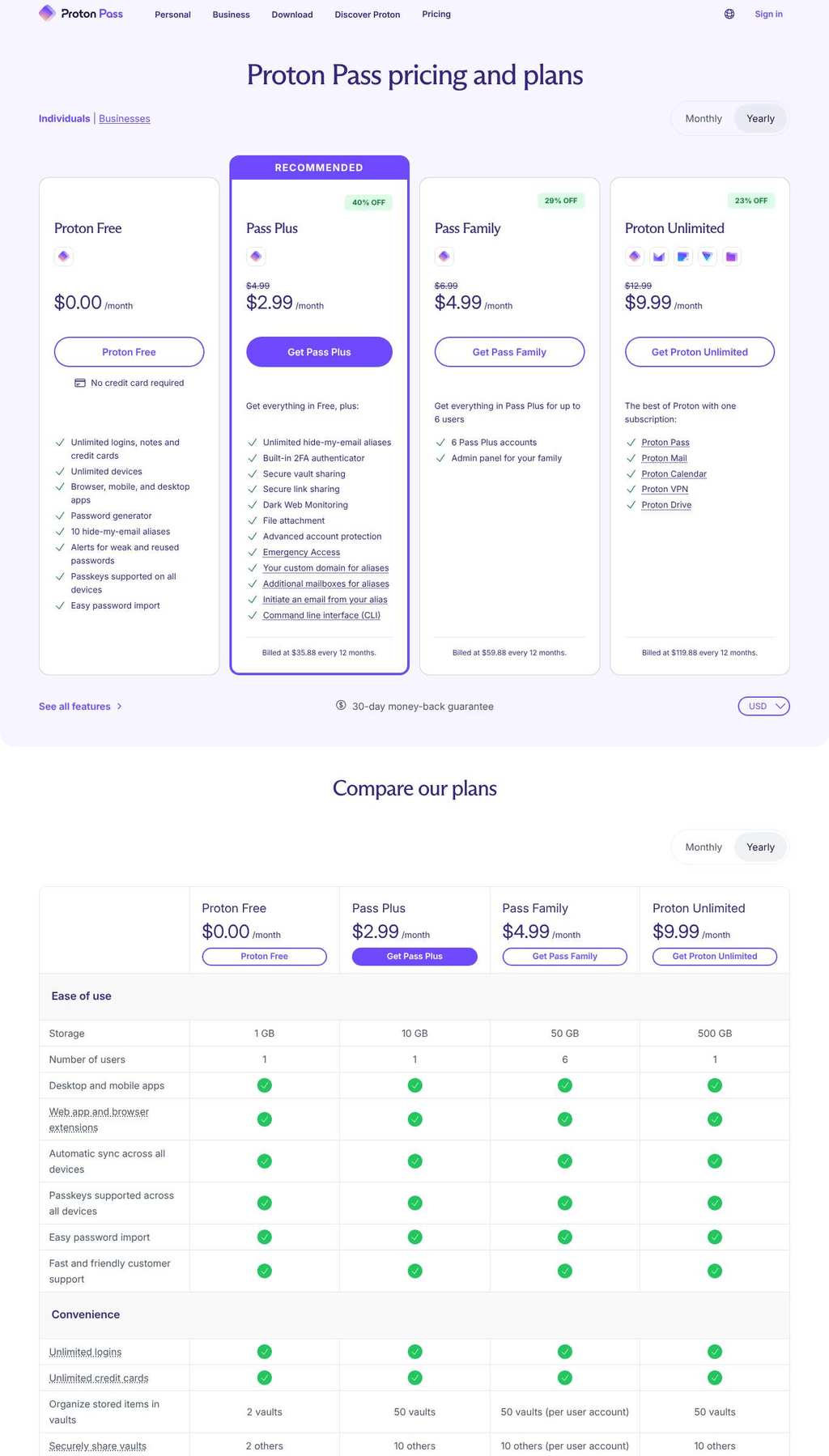
Proton Pass
Password manager from Proton with a free plan on unlimited devices, hide-my-email aliases, and Plus, Family and Proton Unlimited bundles.
$2.99/mobilled yearly. Free plan too
Checked Screenshot of the pricing page (opens in a new tab)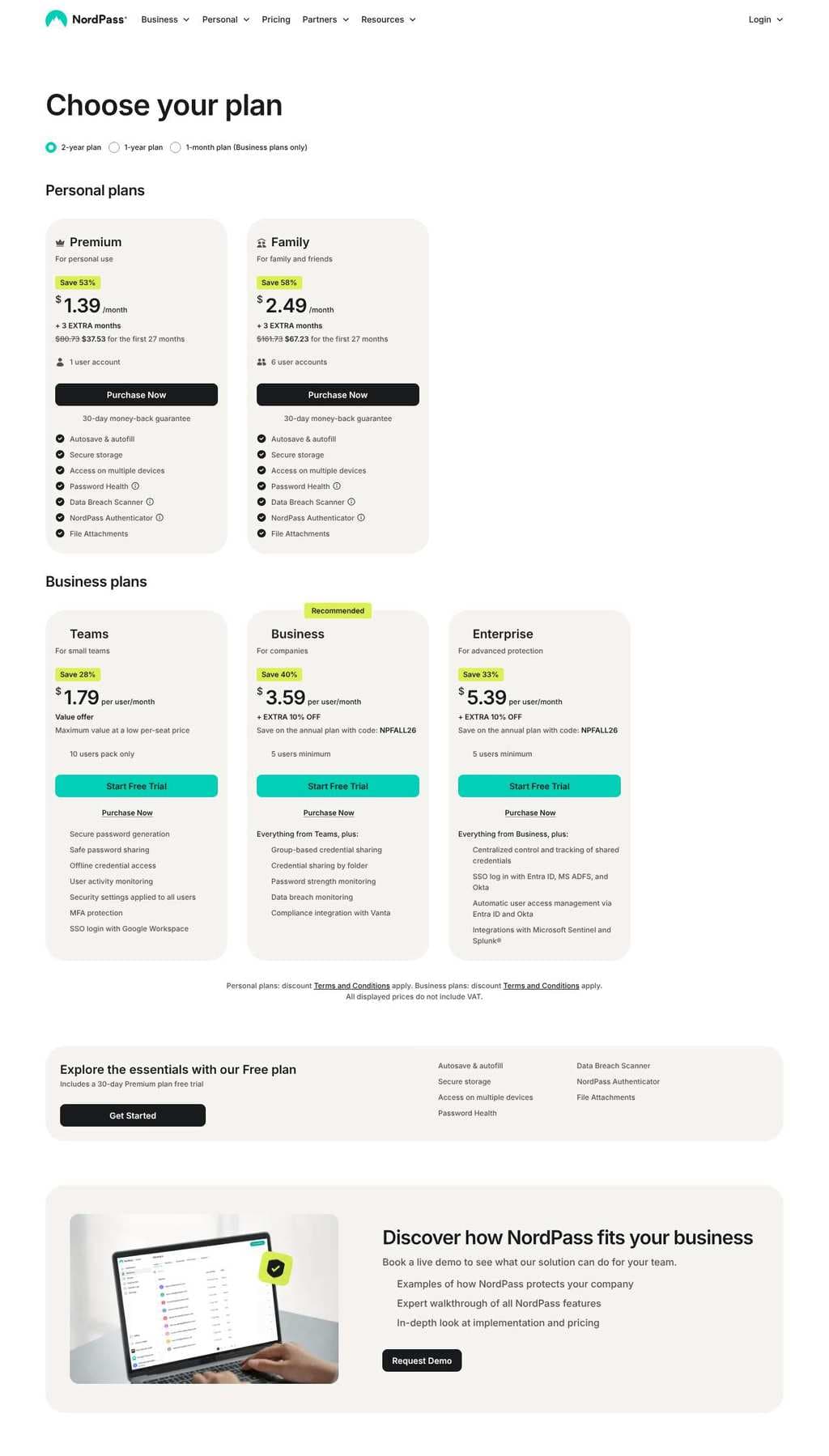
NordPass
Password manager from Nord Security with a Free plan, discounted 1- and 2-year personal plans, and per-user business plans.
$1.39/mo27-month term. Free plan too
Checked Screenshot of the pricing page (opens in a new tab)
1Password
Password manager for individuals, families and businesses, with a 14-day free trial and first-year promotional pricing on annual plans.
$2.99/mobilled yearly, renews $3.99/mo
Checked Screenshot of the pricing page (opens in a new tab)
Dashlane
Password manager with annual Premium and Friends & Family plans that include a VPN, plus a per-user business plan.
$5.42/mobilled yearly
Checked Screenshot of the pricing page (opens in a new tab)
Keeper
Password manager with annual Personal and Family plans and paid add-ons such as BreachWatch and extra file storage.
$3.58/mobilled yearly
Checked Screenshot of the pricing page (opens in a new tab)
Frequently asked questions
Is a free password manager good enough?
For one person it can be. Bitwarden's free plan covers unlimited devices and passwords, and Proton Pass Free covers unlimited logins on unlimited devices, according to their pricing pages. NordPass Free marks access on multiple devices as not included, so check that limit first if you use a phone and a computer.
What happens to my passwords if I stop paying?
It depends on the vendor, and most pricing pages do not say. Before you commit, export a copy of your vault so you are never locked in. Bitwarden states that encrypted export is available on every account.
Do password manager prices go up at renewal?
Some do. 1Password's annual Individual plan was $2.99 a month for the first year and $3.99 a month after that when we checked on 10 October 2026. NordPass and Proton Pass show discounted prices for the first term and do not state the renewal price on their pricing pages.